Deploy with Skyhook
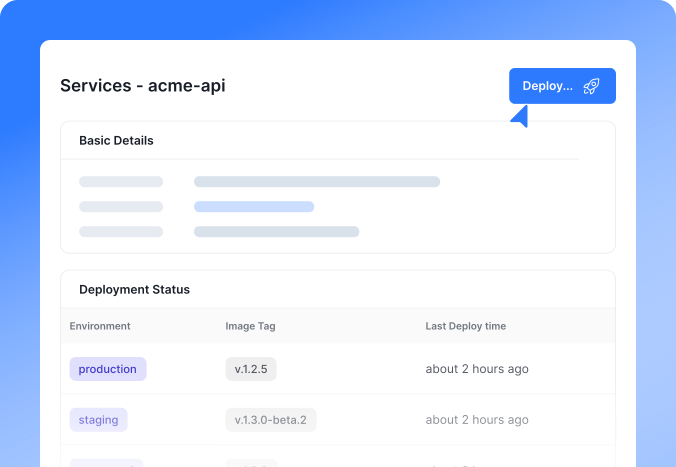
Release your applications in a fast, repeatable, and worry-free process. Skyhook takes container images and launches them onto your Kubernetes cluster with minimal configuration.
How It Works
Select an Image
Choose the container image you want. Skyhook supports images from public or private registries, giving you full flexibility.
Define Deployment Settings
Specify how your application should run – number of replicas, CPU/memory limits, environment variables, and any required services.
One-Click or CI-triggered Deploy
Hit deploy in the dashboard or let Skyhook auto-deploy new images when they pass tests. Skyhook will create or update the Kubernetes resources.
Rolling Updates
Skyhook updates your application using rolling updates by default. New pods come up before old ones are terminated, ensuring continuous service availability.

Access & Networking
Once running, your service is reachable via a stable endpoint. Skyhook can provision a DNS name and TLS certificate for public services.
Features

Zero-Downtime Deployments
Uses Kubernetes rollout mechanisms to update applications without interrupting service. Updates are applied gradually, and only healthy pods receive traffic.

Declarative Configuration
Everything about your deployment can be defined in declarative files. Skyhook can sync with Git so your deployments are version-controlled.

Canary & Blue-Green Support
Gradually shift traffic between old and new versions or run two versions in parallel for testing. Advanced teams can implement canary or blue-green strategies.

Configurable Environments
Deploy to multiple environments (dev, staging, prod) with the same process. Promote a build through environments with one click.

Integration Hooks
Integrate with external CI/CD systems or pipelines. Use GitHub Actions or ArgoCD to trigger Skyhook deployments via API.
Related Reading
Ready to roll?
It's quick and easy to get started.
No credit card required.